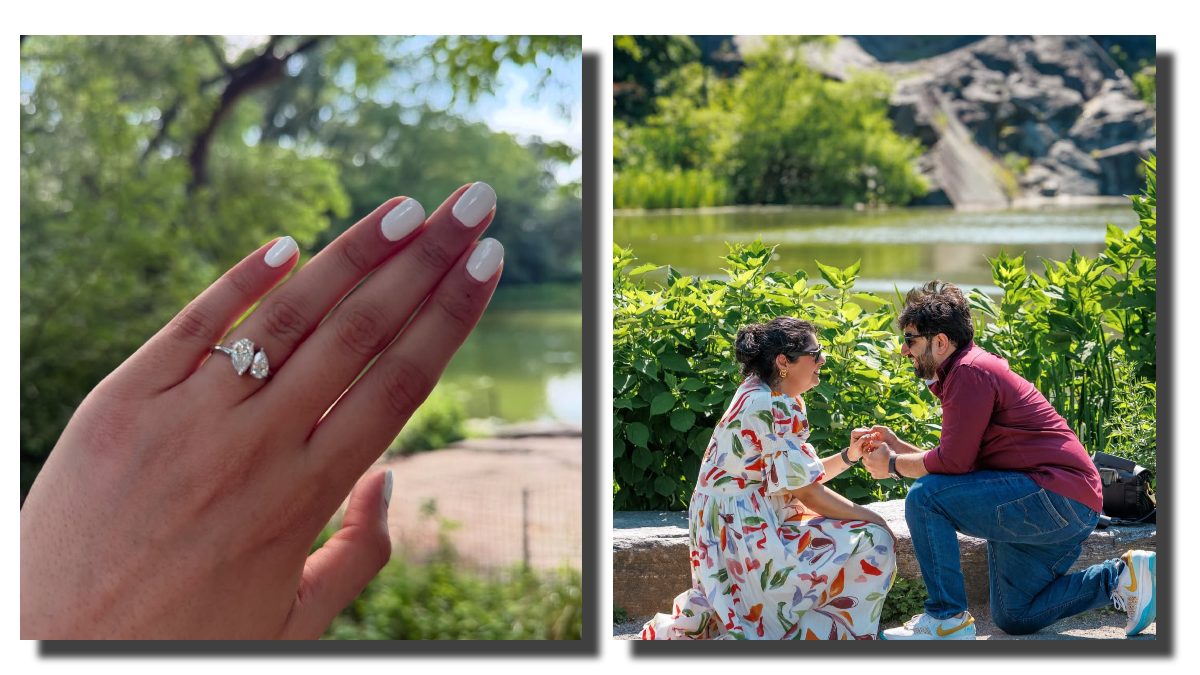
<p style=”text-align: justify;”><strong>Anshula Kapoor Engaged To Rohan Thakkar: </strong>फिल्म निर्माता बोनी कपूर की बेटी अंशुला कपूर ने अपनी जिंदगी के सबसे खूबसूरत लम्हों को सोशल मीडिया पर हाल ही में शेयर किया है, </p>
<p style=”text-align: justify;”>अंशुला ने अपने लॉन्गटाइम बॉयफ्रेंड और स्क्रिप्ट राइटर रोहन ठक्कर से सगाई कर ली है. ये जादुई प्रपोजल न्यूयॉर्क के सेंट्रल पार्क में हुआ , जहां रोहन ने घुटनों पर बैठकर अंशुला को प्रपोज किया .</p>
<p style=”text-align: justify;”><strong>एप के जरिए शुरु हुई इनकी कहानी</strong></p>
<p style=”text-align: justify;”>अंशुला ने इंस्टाग्राम पर बताया कि उनकी और रोहन की मुलाकात एक डेटिंग एप के जरिए हुई थी. एक रैंडम मंगलवार को रात 1:15 बजे दोनों की बात शुरु हुई और वो पहली ही बातचीत सुबह 6 बजे तक चली. अंशुला को तभी लग गया था कि ये रिश्ता कुछ खास है. </p>
<p style=”text-align: justify;”>तीन साल बाद उसी समय रात 1:15 बजे रोहन ने न्यूयॉर्क के सेंट्रल पार्क में उन्हें प्रपोज कर दिया . अंशुला ने लिखा , उस पल ऐसा लगा जैसे दुनिया रुक गई हो. ये वो प्यार था, जो घर जैसा लगता है. मैं कभी परियों की कहानी में भरोसा नहीं करती थी, लेकिन रोहन ने जो दिया है, वो उससे भी बेहतर था. </p>
<p style=”text-align: justify;”>बता दें, रोहन और अंशुला को पिछले कुछ सालों में कई बार साथ में भी देखा गया था लेकिन फिर , साल 2023 में अंशुला ने अपने रिश्ते को सोशल मीडिया पर ऑफिशियल किया था, जब उन्होंने रोहन के साथ अपनी एक तस्वीर शेयर की थी. </p>
<blockquote class=”instagram-media” style=”background: #FFF; border: 0; border-radius: 3px; box-shadow: 0 0 1px 0 rgba(0,0,0,0.5),0 1px 10px 0 rgba(0,0,0,0.15); margin: 1px; max-width: 540px; min-width: 326px; padding: 0; width: calc(100% – 2px);” data-instgrm-captioned=”” data-instgrm-permalink=”https://www.instagram.com/p/DLppHrsNoYC/?utm_source=ig_embed&utm_campaign=loading” data-instgrm-version=”14″>
<div style=”padding: 16px;”>
<div style=”display: flex; flex-direction: row; align-items: center;”>
<div style=”background-color: #f4f4f4; border-radius: 50%; flex-grow: 0; height: 40px; margin-right: 14px; width: 40px;”> </div>
<div style=”display: flex; flex-direction: column; flex-grow: 1; justify-content: center;”>
<div style=”background-color: #f4f4f4; border-radius: 4px; flex-grow: 0; height: 14px; margin-bottom: 6px; width: 100px;”> </div>
<div style=”background-color: #f4f4f4; border-radius: 4px; flex-grow: 0; height: 14px; width: 60px;”> </div>
</div>
</div>
<div style=”padding: 19% 0;”> </div>
<div style=”display: block; height: 50px; margin: 0 auto 12px; width: 50px;”> </div>
<div style=”padding-top: 8px;”>
<div style=”color: #3897f0; font-family: Arial,sans-serif; font-size: 14px; font-style: normal; font-weight: 550; line-height: 18px;”>View this post on Instagram</div>
</div>
<div style=”padding: 12.5% 0;”> </div>
<div style=”display: flex; flex-direction: row; margin-bottom: 14px; align-items: center;”>
<div>
<div style=”background-color: #f4f4f4; border-radius: 50%; height: 12.5px; width: 12.5px; transform: translateX(0px) translateY(7px);”> </div>
<div style=”background-color: #f4f4f4; height: 12.5px; transform: rotate(-45deg) translateX(3px) translateY(1px); width: 12.5px; flex-grow: 0; margin-right: 14px; margin-left: 2px;”> </div>
<div style=”background-color: #f4f4f4; border-radius: 50%; height: 12.5px; width: 12.5px; transform: translateX(9px) translateY(-18px);”> </div>
</div>
<div style=”margin-left: 8px;”>
<div style=”background-color: #f4f4f4; border-radius: 50%; flex-grow: 0; height: 20px; width: 20px;”> </div>
<div style=”width: 0; height: 0; border-top: 2px solid transparent; border-left: 6px solid #f4f4f4; border-bottom: 2px solid transparent; transform: translateX(16px) translateY(-4px) rotate(30deg);”> </div>
</div>
<div style=”margin-left: auto;”>
<div style=”width: 0px; border-top: 8px solid #F4F4F4; border-right: 8px solid transparent; transform: translateY(16px);”> </div>
<div style=”background-color: #f4f4f4; flex-grow: 0; height: 12px; width: 16px; transform: translateY(-4px);”> </div>
<div style=”width: 0; height: 0; border-top: 8px solid #F4F4F4; border-left: 8px solid transparent; transform: translateY(-4px) translateX(8px);”> </div>
</div>
</div>
<div style=”display: flex; flex-direction: column; flex-grow: 1; justify-content: center; margin-bottom: 24px;”>
<div style=”background-color: #f4f4f4; border-radius: 4px; flex-grow: 0; height: 14px; margin-bottom: 6px; width: 224px;”> </div>
<div style=”background-color: #f4f4f4; border-radius: 4px; flex-grow: 0; height: 14px; width: 144px;”> </div>
</div>
<p style=”color: #c9c8cd; font-family: Arial,sans-serif; font-size: 14px; line-height: 17px; margin-bottom: 0; margin-top: 8px; overflow: hidden; padding: 8px 0 7px; text-align: center; text-overflow: ellipsis; white-space: nowrap;”><a style=”color: #c9c8cd; font-family: Arial,sans-serif; font-size: 14px; font-style: normal; font-weight: normal; line-height: 17px; text-decoration: none;” href=”https://www.instagram.com/p/DLppHrsNoYC/?utm_source=ig_embed&utm_campaign=loading” target=”_blank” rel=”noopener”>A post shared by Anshula Kapoor (@anshulakapoor)</a></p>
</div>
</blockquote>
<p style=”text-align: justify;”>
<script src=”//www.instagram.com/embed.js” async=””></script>
</p>
<p style=”text-align: justify;”><strong>आखिर कौन हैं रोहन ठक्कर?</strong></p>
<p style=”text-align: justify;”>रोहन ठक्कर एक स्क्रिप्ट राइटर हैं और वो फिलहाल करण जौहर की कंपनी धर्मैटिक एंटरटेनमेंट के साथ फ्रीलांस काम कर रहे हैं. उन्होंने यूसीएलए से पढ़ाई की है, और न्यूयॉर्क फिल्म अकादमी से मास्टर्स की डिग्री ली है. अंशुला और रोहन की ये सगाई वाली तस्वीरें देख कर उनके चाहने वालों की खुशियों का तो जैसे ठिकाना ही नहीं है, वो इन दोनों के रिश्ते के लिए बेहद खुश हैं. </p>
Subscribe to Updates
Get the latest creative news from FooBar about art, design and business.
‘हम एक ऐप पर मिले और रात भर…’, सगाई की खुशी में अर्जुन कपूर की बहन अंशुला कपूर ने खोला बड़ा सीक्रेट